Disable "Flag for Review" on Instagram for Faster Follower Delivery
If you want your Instagram follower orders to start quickly, make sure "Flag for Review" is turned OFF before placing an order. This setting prevents Instagram from holding new followers for manual approval, helping your order process faster.
Step 1: Open Instagram Settings
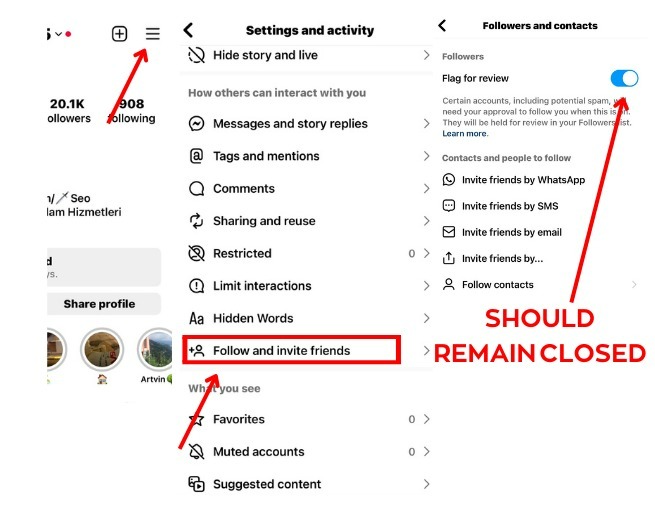
Open the Instagram app and visit your Profile. Tap the ☰ Menu in the top-right corner and select Settings & Activity.
Step 2: Open "Follow and Invite Friends"
Scroll down and tap Follow and Invite Friends.
Step 3: Disable "Flag for Review"
Tap Followers and turn OFF the Flag for Review option.
✅ Keep this setting disabled before placing your follower order.
Why Should You Disable "Flag for Review"?
Instagram's Flag for Review feature places new followers into a review queue, requiring manual approval before they appear on your account. This can slow down or delay follower delivery.
By disabling this feature:
- 🚀 Followers can be delivered much faster.
- ✅ Orders start processing without unnecessary delays.
- 📈 Better delivery experience for Instagram follower services.
- 🔥 Recommended before every follower order.
Important: If your follower order is delayed, always check that Flag for Review is turned OFF.
Get Fast Instagram Followers with Digitallov
At Digitallov.com, we provide high-quality Instagram followers, likes, views, reels views, comments, and complete social media marketing services with fast processing and reliable delivery. Before ordering followers, make sure your Instagram settings are configured correctly to enjoy the best results.
Whether you're a creator, business, brand, influencer, or reseller, disabling Flag for Review helps ensure a smoother and faster follower delivery experience.