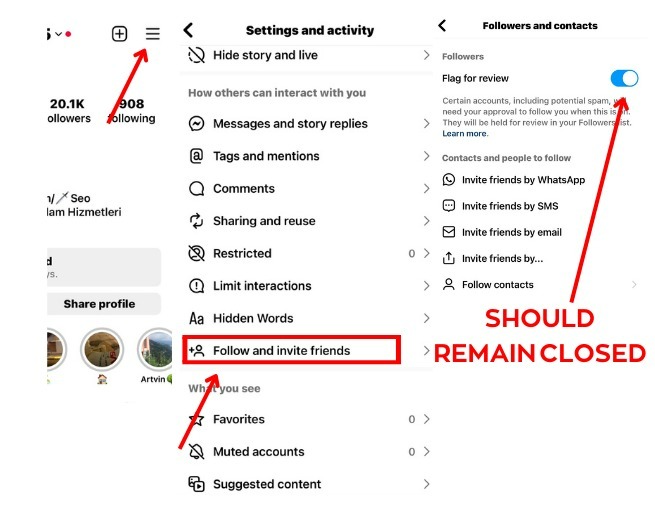
Turn Off “Flag for Review” Before Ordering Instagram Followers on Digitallov
If you want your Instagram follower order to start smoothly, check that “Flag for Review” is turned OFF before placing your order. This setting can affect how Instagram handles new follower activity and may cause followers to require additional review before appearing on your account.
Step 1: Open Instagram Settings
Open the Instagram app, go to your Profile, tap the ☰ Menu in the top-right corner, and select Settings and Activity.
Step 2: Open “Follow and Invite Friends”
Scroll through the settings and tap “Follow and Invite Friends.”
Step 3: Turn Off “Flag for Review”
Open the Followers section and check the “Flag for Review” setting. If it is enabled, turn it OFF before placing your follower order.
✅ Keep this setting disabled when ordering Instagram followers through Digitallov.
Why Turn Off “Flag for Review”?
When Instagram places new followers into a review process, some follower activity may not appear immediately. Disabling the setting can help provide a smoother delivery experience for follower services.
Benefits of Checking This Setting
- 🚀 Helps avoid unnecessary follower-review delays
- ✅ Supports smoother order processing
- 📈 Can improve the overall delivery experience
- 🔥 Recommended before placing a new follower order
Important: If your follower order appears delayed, check your Instagram account settings and confirm that Flag for Review is turned OFF.
Get Instagram Followers with Digitallov
At Digitallov.com, you can find Instagram followers, likes, views, Reels views, comments, and other social media marketing services. Before placing an order, always review the individual service description, delivery information, refill terms, and requirements.
Whether you are a creator, business, brand, influencer, or reseller, checking your Instagram settings before ordering can help create a smoother experience.
Quick Checklist Before Ordering
- ✅ Log in to your Instagram account
- ✅ Open Settings and Activity
- ✅ Go to Follow and Invite Friends
- ✅ Check the Flag for Review setting
- ✅ Turn it OFF if enabled
- ✅ Review the Digitallov service description
- ✅ Place your order